> For the complete documentation index, see [llms.txt](https://kb.bevica.com/llms.txt). Markdown versions of documentation pages are available by appending `.md` to page URLs; this page is available as [Markdown](https://kb.bevica.com/documentation/guides/warehousing-and-logistics/hmrc_excise_warehouse_reporting/hmrc_excise_warehouse_processing.md).
# HMRC Excise Warehouse Processing
Run the processing steps behind HMRC excise warehouse reporting.
{% hint style="info" %}
Bevica HMRC functionality is a separate extension to Bevica Essentials. Please contact your system administrator or your TVision contact if you would like further information or would like to install Bevica HMRC Reporting.
{% endhint %}
HMRC Excise Warehouse processing functionality tracks all relevant inbound and outbound movements with rotation numbers in a manner that complies with UK HMRC requirements. See also [HMRC Excise Warehouse Reporting](/documentation/guides/warehousing-and-logistics/hmrc_excise_warehouse_reporting.md)
{% hint style="warning" %}
**Prerequisites**
Set up system, purchasing, inventory and sales.
Knowledge of HMRC reporting requirements.
{% endhint %}
### Introduction
A key HMRC requirement for operating an approved excise bonded warehouse is to audit and track all movements. This is typically done using **Rotation numbers**, a trackable number assigned on receipt.
### Setup
### Location
Navigate to the relevant Location and **Rotation Tracking** fasttab. Here you can populate both Duty Free and Duty Paid Rotation numbers and switch on the functionality for this Location.

Typical format for rotation number series is, for duty free YY/NNNNNN (i.e. 24/001589) and for Duty Paid YY/DNNNNNN (i.e. 24/D001254), updated every year.
We recommend setting **Bin Mandatory** and warehouse documents (Receipts, Put-Aways, Picks & Shipments) as required for this Location. **Directed Pick & Put-Aways** is not supported though.
### Inventory Setup
Navigate to Inventory Setup and the **Numbering** fasttab. Here populate the **Package Nos** field.
### Item Tracking Codes
Navigate to Item Tracking Codes and create a new record ticking **Package Specific Tracking**.

### Items
Each item needs to be assigned the **PACKAGE** item tracking code, **Item Tracking** fasttab. This can be done manually or via a Configuration Package.

{% hint style="info" %}
If the item has open inventory you will see this error message:
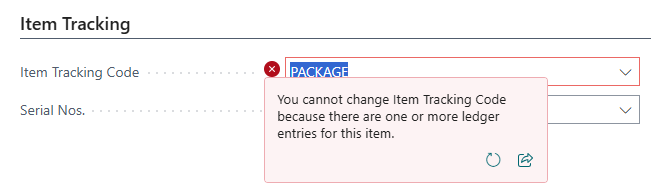 In this case you will need to journal out all stock out (Negative Adjustment), change the Item Tracking Code and journal the inventory back in (Positive Adjustment).
{% endhint %}
### Processing
With the above setup, a Package No. will need to be assigned to every receipt, this provides the audit and Rotation No. required by HMRC. Receipts include: Purchase Orders, Transfer Orders (Receipt), Positive/Purchase Item Journal lines, Physical Inventory Journals, Assembly Orders.
To maintain data integrity, package tracking is enforced across all Locations.
**Assigning Package Nos. to a receipt line, e.g. purchase order line**
Purchase orders are created as normal, Package Nos. are assigned just before receipt when quantities, format etc have been confirmed. From the Purchase subform ribbon select **Item Tracking Lines**, here you click **Assign Package No.** for the system to populate the line with the next available Package number.

A similar process exists on all receipt document lines.
**Assigning Package Nos. to an outbound line**
All outbound lines, i.e. Sales Order line, Transfer Order Shipment, require the Package No. to be assigned. This is done automatically by the system when the line is Reserved. The Item Ledger Entry the reservation is held against also holds the Package number.
### Viewing Rotation numbers
Package and Rotation numbers can be seen in a variety of pages.
**Item Ledger Entry (ILE)**
The ILE displays both, Package No. and Rotation No. fields and can be used to filter all movements by these references.
**Package No. Information List**
This lists Item No, Package No, Rotation No, Duty Status and Inventory figure. This can be used to provide an audit of the initial receipt and all subsequent movements from that Package/Rotation number.
**HMRC Ledger Entry**
This details all movements in and out of the Bonded warehouse Location, it provides Location Code, Item No, Rotation No, Duty Status amongst other HMRC related information.
---
# Agent Instructions
This documentation is published with GitBook. GitBook is the documentation platform designed so that both humans and AI agents can read, navigate, and reason over technical content effectively. Learn more at gitbook.com.
## Querying This Documentation
If you need additional information that is not directly available in this page, you can query the documentation dynamically by asking a question.
Perform an HTTP GET request on the current page URL with the `ask` query parameter, and the optional `goal` query parameter:
```
GET https://kb.bevica.com/documentation/guides/warehousing-and-logistics/hmrc_excise_warehouse_reporting/hmrc_excise_warehouse_processing.md?ask=&goal=
```
`ask` is the immediate question: it should be specific, self-contained, and written in natural language.
`goal` is optional and describes the broader end goal you are ultimately trying to accomplish on behalf of the user. GitBook uses it to tailor the answer towards what is most useful for that goal.
The response will contain a direct answer to the question and relevant excerpts and sources from the documentation.
Use this mechanism when the answer is not explicitly present in the current page, you need clarification or additional context, or you want to retrieve related documentation sections.
In this case you will need to journal out all stock out (Negative Adjustment), change the Item Tracking Code and journal the inventory back in (Positive Adjustment).
{% endhint %}
### Processing
With the above setup, a Package No. will need to be assigned to every receipt, this provides the audit and Rotation No. required by HMRC. Receipts include: Purchase Orders, Transfer Orders (Receipt), Positive/Purchase Item Journal lines, Physical Inventory Journals, Assembly Orders.
To maintain data integrity, package tracking is enforced across all Locations.
**Assigning Package Nos. to a receipt line, e.g. purchase order line**
Purchase orders are created as normal, Package Nos. are assigned just before receipt when quantities, format etc have been confirmed. From the Purchase subform ribbon select **Item Tracking Lines**, here you click **Assign Package No.** for the system to populate the line with the next available Package number.

A similar process exists on all receipt document lines.
**Assigning Package Nos. to an outbound line**
All outbound lines, i.e. Sales Order line, Transfer Order Shipment, require the Package No. to be assigned. This is done automatically by the system when the line is Reserved. The Item Ledger Entry the reservation is held against also holds the Package number.
### Viewing Rotation numbers
Package and Rotation numbers can be seen in a variety of pages.
**Item Ledger Entry (ILE)**
The ILE displays both, Package No. and Rotation No. fields and can be used to filter all movements by these references.
**Package No. Information List**
This lists Item No, Package No, Rotation No, Duty Status and Inventory figure. This can be used to provide an audit of the initial receipt and all subsequent movements from that Package/Rotation number.
**HMRC Ledger Entry**
This details all movements in and out of the Bonded warehouse Location, it provides Location Code, Item No, Rotation No, Duty Status amongst other HMRC related information.
---
# Agent Instructions
This documentation is published with GitBook. GitBook is the documentation platform designed so that both humans and AI agents can read, navigate, and reason over technical content effectively. Learn more at gitbook.com.
## Querying This Documentation
If you need additional information that is not directly available in this page, you can query the documentation dynamically by asking a question.
Perform an HTTP GET request on the current page URL with the `ask` query parameter, and the optional `goal` query parameter:
```
GET https://kb.bevica.com/documentation/guides/warehousing-and-logistics/hmrc_excise_warehouse_reporting/hmrc_excise_warehouse_processing.md?ask=&goal=
```
`ask` is the immediate question: it should be specific, self-contained, and written in natural language.
`goal` is optional and describes the broader end goal you are ultimately trying to accomplish on behalf of the user. GitBook uses it to tailor the answer towards what is most useful for that goal.
The response will contain a direct answer to the question and relevant excerpts and sources from the documentation.
Use this mechanism when the answer is not explicitly present in the current page, you need clarification or additional context, or you want to retrieve related documentation sections.